BGD66 deposit allows members to add funds to their accounts and participate in online games through various payment methods. Deposits can be made easily via the website or mobile phone, giving players the flexibility to choose a suitable bank or e-wallet to complete their transactions. Start trading at BGD66 today.
Deposit transaction limits at BGD66
BGD66 deposit steps allow players to check transaction limits before making a deposit, helping them avoid entering an amount below the minimum or above the maximum limit for each payment method. NAGAD, Bkash, and Rocket each have their own minimum and maximum deposit limits, as follows:
| Deposit method | Minimum limit | Maximum limit |
| NAGAD | 300 BDT | 50,000 BDT |
| Send Money Nagad | 300 BDT | 10,000 BDT |
| Bkash | 500 BDT | 50,000 BDT |
| Send Money Bkash | 1,000 BDT | 40,000 BDT |
| ROCKET | 100 BDT | 20,000 BDT |
How to make a BGD66 deposit
BGD66 deposit involves a simple process on the website, allowing players to complete transactions quickly. Verify the transaction amount, payment method, and account information before proceeding.
How to BGD66 deposit quickly using NAGAD
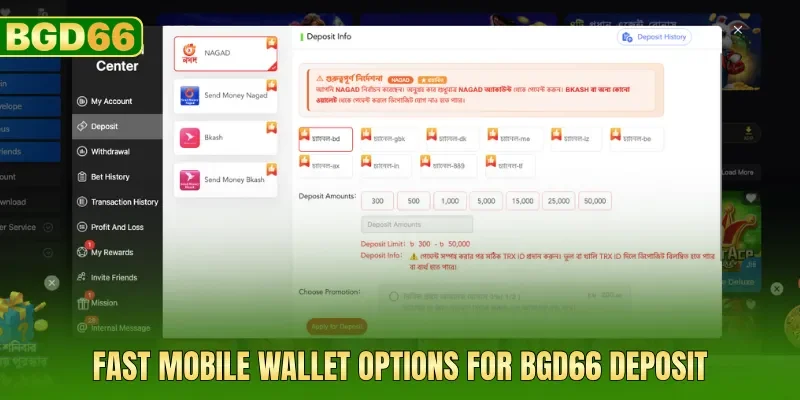
The NAGAD wallet supports transactions ranging from 300 BDT to 50,000 BDT, with several amounts available to choose from. Players should transfer funds from their personal NAGAD accounts and keep the transaction ID for confirmation.
- Step 1: Select NAGAD as the payment method and choose an available payment channel on the screen.
- Step 2: Enter an amount between 300 BDT and 50,000 BDT, or select one of the quick amounts: 300 BDT, 500 BDT, 1,000 BDT, 5,000 BDT, 10,000 BDT, 20,000 BDT, or 25,000 BDT.
- Step 3: Select a promotional package if you want to participate, then click Apply for Deposit to receive the payment account details.
- Step 4: Open the NAGAD app, complete the transfer, and enter the correct transaction ID (TRX ID) to confirm the payment.
BGD66 deposit process via Send Money Nagad
Send Money Nagad has a transaction limit of 300 BDT to 10,000 BDT per deposit. When following the BGD66 deposit methods in the app, players should select the Send Money feature instead of Cash Out to avoid confusion.
- Step 1: Select Send Money Nagad and choose the appropriate transaction channel from the list.
- Step 2: Enter an amount between 300 BDT and 10,000 BDT, or select one of the quick amounts: 300 BDT, 500 BDT, 1,000 BDT, 3,000 BDT, 5,000 BDT, or 10,000 BDT.
- Step 3: Select the promotion you want or skip the offer, then click Apply for Deposit.
- Step 4: Open your NAGAD wallet, transfer the funds using Send Money, and enter the TRX ID in the transaction confirmation section.
Add funds to your account through Bkash
Bkash supports a minimum deposit of 500 BDT and a maximum of 50,000 BDT per BGD66 deposit transaction. Players should use their personal Bkash wallets to make payments and confirm their deposits.
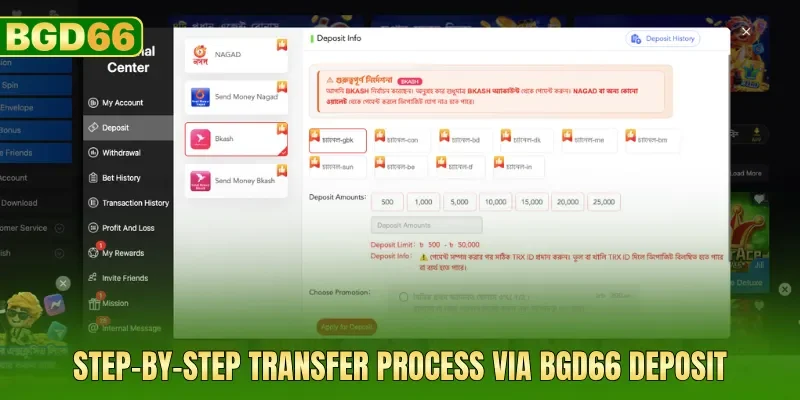
- Step 1: Select Bkash from the left-hand column, then choose an available payment channel.
- Step 2: Enter an amount between 500 BDT and 50,000 BDT, or select one of the following amounts: 500 BDT, 1,000 BDT, 5,000 BDT, 10,000 BDT, 20,000 BDT, or 25,000 BDT.
- Step 3: Choose a suitable promotional offer, then click Apply for Deposit.
- Step 4: Open the Bkash app to make the payment and enter the correct TRX ID after the transfer is successful.
BGD66 deposit instructions via Send Money Bkash
Send Money Bkash supports transactions ranging from 1,000 BDT to 40,000 BDT per transfer. Players who want to BGD66 deposit online should select the correct Send Money feature in their Bkash wallet and avoid confusing it with Cash Out.
- Step 1: Select Send Money Bkash and choose an available transaction channel.
- Step 2: Enter an amount between 1,000 BDT and 40,000 BDT, or select one of the quick amounts: 1,000 BDT, 3,000 BDT, 5,000 BDT, 10,000 BDT, 20,000 BDT, or 25,000 BDT.
- Step 3: Select an accompanying promotion or skip the offer, then click Apply for Deposit.
- Step 4: Open your Bkash wallet, transfer the funds using Send Money, and enter the correct TRX ID in the confirmation form.
3 steps to deposit via ROCKET
ROCKET is suitable for smaller transactions, with a deposit limit ranging from 100 BDT to 20,000 BDT per transaction. Players should make payments using their personal ROCKET accounts and keep their transaction details for reference.
- Step 1: Select the ROCKET icon from the deposit method list and choose the corresponding payment channel.
- Step 2: Enter an amount between 100 BDT and 20,000 BDT, or select one of the quick amounts: 100 BDT, 500 BDT, 1,000 BDT, 2,000 BDT, 5,000 BDT, 10,000 BDT, or 20,000 BDT.
- Step 3: Select a promotional package if you are eligible, then click Apply for Deposit.
- Step 4: Complete the payment through the ROCKET app and enter the correct TRX ID to confirm the transaction.
Important things to know when making a BGD66 deposit
When making a BGD66 deposit, players should carefully check their payment details to minimize transaction errors. The following tips can help you complete the process accurately and make it easier to verify transactions when necessary.
Check the deposit limits before transferring funds
Each BGD66 deposit method has its own minimum and maximum transaction amounts. Players should check the applicable limits before entering an amount to avoid having their deposit requests rejected. For example, ROCKET accepts transactions starting at 100 BDT, while Bkash requires a minimum deposit of 500 BDT.
Make sure the e-wallet is registered under your name
Players should use NAGAD, Bkash, or ROCKET accounts registered in their own names to make transactions. Payment account details should be checked carefully before transferring funds. Using someone else’s wallet may complicate the verification process or delay the crediting of funds.

Provide the valid transaction reference (TRX ID)
The TRX ID is important for verifying funds transferred from an e-wallet to the system. After making a BGD66 deposit, players should copy the transaction ID displayed in the NAGAD, Bkash, or ROCKET app accurately. Do not add characters, delete digits, or enter the ID from a previous transaction by mistake.
Avoid placing multiple deposit requests simultaneously
Players should wait for the current transaction to be confirmed before creating another deposit request. Submitting multiple requests in quick succession may cause confusion about the amount, payment details, or TRX ID. If funds have been deducted but the account balance has not been updated, check your transaction history and keep the receipt.
Conclusion
BGD66 deposit offers several payment methods through NAGAD, Bkash, and ROCKET, with flexible limits ranging from 100 BDT to 50,000 BDT. When making a transfer, players should choose a suitable payment channel, carefully verify the transfer details, and enter the correct TRX ID to complete the transaction.