BGD66 withdrawal allows players to transfer their winnings to personal accounts through payment methods such as Nagad, Bkash, and Rocket. Before submitting a request, players should check their available balance, the minimum and maximum withdrawal limits, and the receiving account details on BGD66 to avoid errors.
Requirements for submitting a BGD66 withdrawal request
Before making a BGD66 withdrawal online, players need to meet several requirements set by the platform. Review the following conditions to help ensure that your withdrawal request is accepted smoothly.
- Valid account: Log in using a registered account and complete the required verification steps.
- Available balance: Your account must have sufficient funds to cover the transaction after deducting any unsettled bets, if applicable.
- Receiving account details: Use a bank account or e-wallet registered in your own name, with details matching your registration information.
- Withdrawal limits: The requested amount must fall within the minimum and maximum limits applicable to the selected payment method.
- Promotional requirements: Complete the wagering requirements or other conditions attached to promotions before submitting a withdrawal request.
- No pending transactions: Check the status of previous deposit or withdrawal requests to avoid submitting duplicate transactions.
How to set a withdrawal password for your first transaction
Players need to set a withdrawal password before submitting their first BGD66 withdrawal fast request. Follow these four steps to create a password and protect your personal transactions.
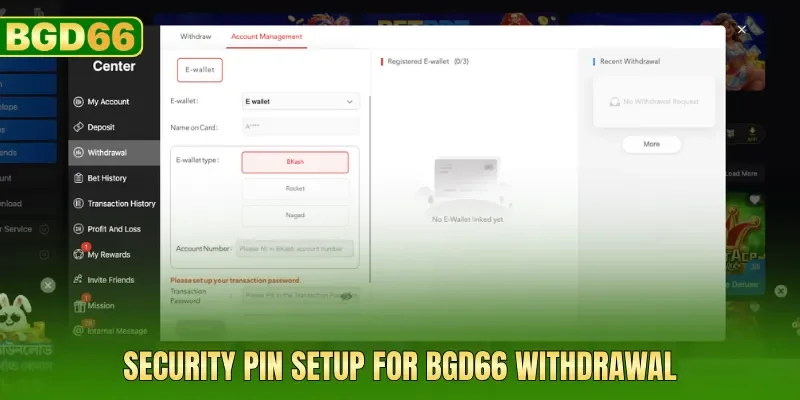
- Step 1: Log in to your BGD66 account and access the Personal Account section on the main interface.
- Step 2: Select Security Settings or Withdrawal Password to open the setup feature.
- Step 3: Enter a new withdrawal password according to the displayed requirements, then re-enter it for confirmation.
- Step 4: Click Confirm or Save to finish. Keep your password secure and never disclose it to anyone.
Detailed BGD66 withdrawal instructions
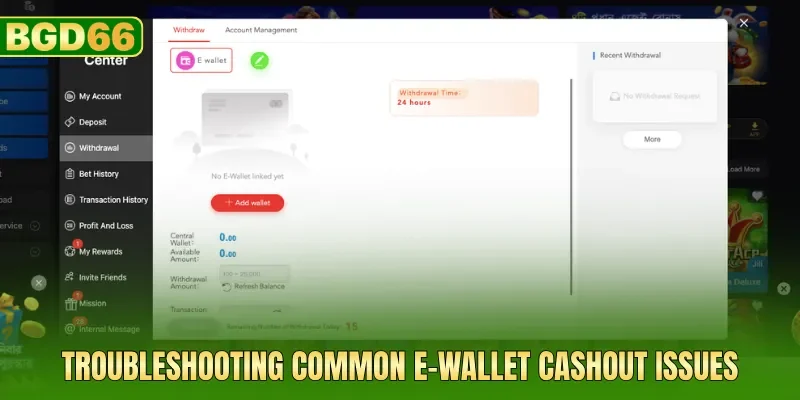
BGD66 withdrawal steps support withdrawals through e-wallets, with limits ranging from 100 BDT to 25,000 BDT per transaction. Players can submit up to 15 requests per day and make withdrawals at any time by following these instructions:
- Step 1: Log in to your account, access the Withdraw section, and select E-wallet as the payment method.
- Step 2: Click the red + Add wallet button to link a receiving e-wallet if you have not added one previously.
- Step 3: Check your available balance (Available Amount), then enter the amount you want to withdraw in the Withdrawal Amount field, within the limit of 100 BDT–25,000 BDT.
- Step 4: Enter your transaction password (Transaction Password) and click Submit in the bottom-left corner to send your withdrawal request.
Important notes when making a BGD66 withdrawal
To ensure a smooth BGD66 withdrawal process, players should carefully check their account details and transaction requirements before submitting a request. Here are four important tips to help minimize errors and prevent withdrawal requests from being rejected.
Check your e-wallet details carefully
Before submitting a withdrawal request, players should verify the wallet number and the name of the receiving account holder. The registered details must match the verification information in the BGD66 withdrawal system to avoid verification errors. If you enter an incorrect phone number or select the wrong e-wallet provider, the funds may be sent to an unintended destination.
Ensure your balance meets the withdrawal limits
The platform supports e-wallet withdrawals ranging from 100 BDT to 25,000 BDT per transaction. Players should check their available balance (Available Amount) before entering the amount in the Withdrawal Amount field. If the requested amount is below the minimum or exceeds the maximum limit, the system may reject the request.
Keep your transaction password secure
The Transaction Password is an important verification detail when making a BGD66 withdrawal. Players should create a separate password and avoid using simple number sequences or reusing their login password. Never share your password, OTP code, or security information with anyone, including people claiming to be support representatives.
Check the progress of your withdrawal request
After clicking Submit, players should visit their transaction history to check the processing status of their withdrawal request. BGD66 allows up to 15 withdrawals per day, so you should keep track of the number of requests submitted to avoid exceeding the limit. If the funds do not arrive in your wallet within the expected processing time, save the transaction ID and a screenshot of the status for reference.
How to fix withdrawal errors on BGD66
During the BGD66 withdrawal process, players may encounter errors that cause requests to be rejected or prevent funds from reaching their wallets. Here are some frequent issues and how to resolve them:
- Incorrect e-wallet details: Check the account number, phone number, and wallet holder’s name, then update any incorrect information.
- Insufficient balance for the withdrawal limit: Compare your Available Amount with the minimum withdrawal limit of 100 BDT and maximum limit of 25,000 BDT, then adjust the requested amount accordingly.
- Incorrect Transaction Password: Check your transaction password or use the password reset feature if you cannot remember it.
- Unfulfilled promotional requirements: Check any outstanding wagering requirements and complete the promotion conditions before submitting a withdrawal request.
- Transaction still pending: Visit your withdrawal history to track the request status and avoid submitting duplicate requests.
- E-wallet service issues: Check whether NAGAD, Bkash, or ROCKET is operating normally, then try again when the service is stable.
- Funds deducted but not received in the wallet: Keep the transaction ID and payment receipt, then contact BGD66 customer support to have the transaction checked.
- Account not fully verified: Check your verification status and provide any additional personal information required before submitting a withdrawal request.
- Exceeded the daily withdrawal limit: Review your transaction history to ensure you have not exceeded the limit of 15 withdrawals per day. If you have reached the maximum, wait until the following day.
- System maintenance or overload: Wait until the system is operating normally, then log in again to check the status and submit a new request if the previous one has failed.
Conclusion
BGD66 withdrawal supports e-wallet withdrawals with flexible limits ranging from 100 BDT to 25,000 BDT per transaction. Players simply need to link a wallet registered in their own name, set a transaction password, and verify their details before confirming. Follow the instructions carefully to minimize errors and make it easier to track withdrawal requests.