
BGD66 login is an essential step that allows members to access their personal accounts and continue playing games on the platform. Simply enter the correct registered username and password, and the system will verify your information before redirecting you to the main interface. In addition to login instructions, BGD66 also provides solutions to common issues such as incorrect passwords, forgotten login details, and connection problems.
Requirements to meet before BGD66 login
Before proceeding with BGD66 login online, members should prepare all the necessary information and a device with a stable internet connection. The following basic requirements help ensure a smooth login process and minimize potential errors.
- Existing BGD66 account: Players must complete registration and have a valid account before logging in.
- Remember your username: Use the correct username you created without changing any characters or the order of the numbers.
- Prepare the correct password: Enter the password you previously set, paying attention to uppercase and lowercase letters and any special characters.
- Compatible device: You can use an Android or iOS smartphone or a computer to access the platform.
- Stable internet connection: Make sure your Wi-Fi or mobile data is working properly to avoid interruptions during login.
- Access the correct website: Use the official BGD66 website or app to reduce the risk of accessing a fake website.
BGD66 login instructions
BGD66 login website allows members to access their accounts directly through the website or app using a smartphone or computer. Players simply need to follow the correct login steps and enter their personal information accurately to reach the main interface and continue using the platform’s features.
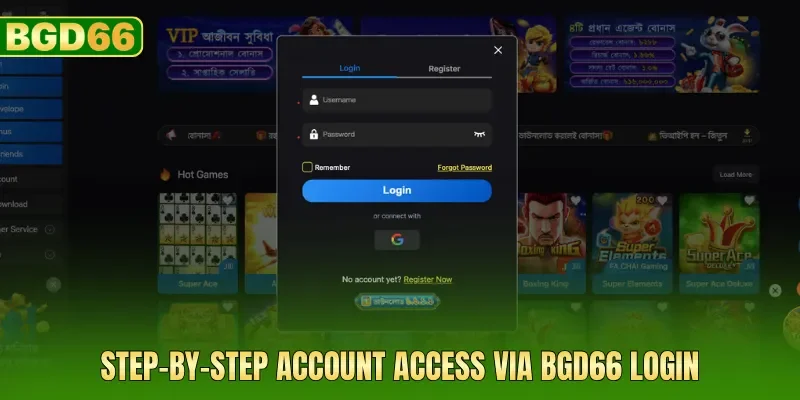
Account login process on PC
Players can perform BGD66 login on a computer using popular browsers such as Google Chrome, Safari, Firefox, or Microsoft Edge. Follow these steps to complete the process:
- Step 1: Open a browser on your computer and visit the official BGD66 website.
- Step 2: Click the Login button on the homepage to open the login form.
- Step 3: Enter your registered account name in the username field.
- Step 4: Enter the corresponding password in the password field, paying attention to uppercase and lowercase letters and special characters.
- Step 5: Review your information and click the Login button to submit your request.
- Step 6: Wait for the system to verify your details and redirect you to your personal account interface.
How to log in to BGD66 on mobile
Members can log in using an Android or iOS phone through the installed BGD66 app or a mobile browser. Regardless of the method, players must enter the correct registered username and password.
- Step 1: Open the BGD66 app on your phone or visit the website using a browser.
- Step 2: Click Login from the homepage.
- Step 3: Enter your account name in the login field exactly as registered.
- Step 4: Enter your password in the corresponding field. You can tap the password visibility icon to check your entry before proceeding.
- Step 5: Tap the Login button and wait for the system to verify your information.
- Step 6: Once logged in successfully, you can access your account and use the platform’s features.
Important notes when using BGD66 login
During BGD66 login, players should pay attention to several details to avoid entering incorrect information or encountering access issues. Follow the instructions carefully and review your information before submitting a login request.
Double-check your login credentials before proceeding
Members must enter the correct username and password used when registering with BGD66. Uppercase and lowercase letters, numbers, and special characters must all be entered accurately. If incorrect details are entered too many times, the system may reject the login request or temporarily lock access. Players should check every character before clicking Confirm.
Access the correct BGD66 website or app
Players should use the official website address or the installed BGD66 app to log in to their accounts. Avoid clicking unfamiliar links sent by unknown sources. Fake websites may use similar interfaces to collect usernames and passwords. Verify the website URL before submitting your login details to keep your account safe.
Keep your account credentials private at all times
Your username and password are personal information that you should keep secure throughout your use of BGD66. Do not send your password through messages or provide it to anyone claiming to be a support representative without verifying their identity. If you log in on a public device, remember to log out afterward and avoid saving your password in the browser.
Make sure your internet connection is reliable
Before using BGD66 login online / website, members should check their Wi-Fi or mobile data connection. An unstable connection may cause the login page to load slowly, freeze, or fail to send information to the system. If this happens, players can switch to another network or reload the website or app. Additionally, keep your browser and app updated to the latest versions to reduce compatibility issues.
How to fix BGD66 login errors
During BGD66 login, members may encounter issues such as incorrect passwords, locked accounts, missing verification codes, or inaccessible websites. Each problem may have a different cause, so players should identify the specific issue and apply the appropriate solution to regain access as soon as possible.
- Incorrect username or password: Check each character carefully, paying attention to uppercase and lowercase letters and special characters. If login issues persist, try resetting your password.
- Forgotten password: Select the Forgot Password option on the login screen, then follow the verification instructions to set a new password.
- Locked account: Do not continue trying random passwords. Contact BGD66 customer support to find out why the account was locked and receive instructions on how to restore access.
- Website inaccessible: Check your internet connection, reload the page, or switch to another browser. Players must confirm they are accessing the official website.
Conclusion
BGD66 login allows members to access their accounts quickly through both the website and mobile app. Players simply need to prepare the correct username and password and follow the provided instructions to complete the login process. Following these steps can help ensure a smooth login experience and minimize interruptions when playing games on BGD66.